
List of Servers
| Server | Region | IP | Click To Join |
|---|---|---|---|
| Casual Server | EU | node01.udl.tf:27017 | Join Server |
| Advanced Server #1 | EU | node01.udl.tf:27015 | Join Server |
| Advanced Server #2 | EU | node01.udl.tf:27016 | Join Server |
| Advanced Server #3 | NA | na-va-01.udl.tf:27015 | Join Server |

The active roster is limited to the given format (2v2 & 3v3)
Teams are allowed to add 1 substitute who can jump in to replace
somebody on the active roster if needed.
Note that substitutes will only receive tournament rewards if they
actively play at least one match.
Credits Metacloud
United Dodgeball League Season 1
UDL is proud to announce a new format for 2026; going forward, we are doing seasonal competitions.
This will ensure fair competition for a big, annual cup held at the end of the year.
Rest assured, medals and key prices will be given out in all seasonal tournaments as well.
This time, teams of three will compete in a swiss style bracket to accumulate a score.
Important Times
The tournament will take place over 4 weeks, starting 3rd of March, 2026 and ending on the 31st. Signups are open starting now (16th) until the end of the month. If you want to sign up click here.
Good luck to everyone and god speed! (in MPH)
Credits Metacloud
United Dodgeball League 2025
UDL is proud to announce a new season of dodgeball this time with 2v2 action. The tournament will have a prizepool of 750 keys and medals up for grabs for both participants and players that place.
We are also proud to announce that UDL got sponsored by LytuS and Kyoto by an astounding 500 keys!
We also proud to say we recieved a donation from zyaquix by a 150 keys!
The tournament will run for three weeks with matches being swiss style up until playoffs which will be single elimination. Signups will open on November 10th and close November 25th. The tournament will run from November 26th till December 14th so don't miss your chance!
Many players in Dodgeball will tell you to change various config settings in TF2 for
a boost in performance or latency. And while there's absolutely some valid tricks to
gain a huge improvement for a very, very, very outdated engine trying to cope with
modern networking, there's also a lot of myths and misinformation that has been
spread over the decades, making this a topic of discussion in many db communities.
I will attempt to dispel some of them and give actual, objective, evidence based no bullshit advice here.
What even is Lerp?
Your game receives position updates from the server at a fixed rate (like 66 or 128 times per second) this is commonly known as "tick-rate". However, Those updates don’t arrive perfectly on time because:
- network jitter
- packet loss
- variable latency
- server tick timing
Are all a real concern for real-time internet servers that connect through various ISP's and countries.
So TF2 uses interpolation (lerp) to render gameplay smoothly.
Instead of showing you the most recent server position immediately, it intentionally draws the game slightly in the past, using a small buffer of time to fill in animation between packets.
If TF2 showed you only the raw positions as they arrive, movement would look choppy, rockets/players would teleport, hit reg would feel inconsistent, jittery clients would ruin the visual flow, player models would rubberband constantly.
Interpolation hides all of this.
How lerp is calculated
the formula is pretty simple:
lerp = cl_interp_ratio / cl_updaterate
example:
cl_interp_ratio 1 / cl_updaterate 128 = 7.8ms lerp
cl_interp_ratio 2 / cl_updaterate 128 = 15.6ms lerp
Why adding more lerp (higher ratio) can help stability
A larger lerp buffer gives the game:
- more time to handle late packets
- more protection against bursty jitter
- smoother visual motion during spikes
But the tradeoffs are:
- slightly more delay between real action and what you see
- slightly sluggish dodge timing
- slower response for deflecting rockets
This is why competitive players prefer "minimum lerp", while casual players sometimes use ratio 2 for smoother animation.
Why Valve designed it this way
Source for tf2 was designed in a different era of the internet (eta 2004-2007).
A lot has changed since, internet speeds were slower, jitter was far worse, packet loss was something to be expected, players came from dial-up/ADSL connections and source needed
clean motion for physics and hit reg. Interpolation helped with all of these.
Interpolation in tfdb (Dodgeball)
For normal tf2 gameplay, competitive players have for many years figured out that projectiles benefit more from lowering predictive interpolation than hit scan does.
so for many professional E-Sport players, a standard had become using different settings
per-class. Using what's called a class config. These can be found with many full suite configs
these days but can also be manually created.
For Hit-scan, the accepted wisdom has been to leave your
interpolation at 35ms.
cl_interp 0.035 + cl_updaterate 66
This ensures smooth predictions with minimal input.
Though for projectile based weapons and classes, players used
a lower ratio of 15.2ms.
cl_interp 0.0152 + cl_updaterate 66
for example on: Soldier, Demoman, Medic, Bow-Sniper, and notably, Pyro.
Why Pyro? Well aside the incredibly strong arsenal of secondary projectile weapons Pyro has,
Pyro also has a very strong ability with Airblast, reacting to and predicting the trajectory, speed and timing of projectiles fired at you becomes even more important in those scenarios.
For competitive play then, players have been using 15.2ms for Pyro.
Dodgeball on the other hand has some custom configurations that allow for 128 Tick on a server.
This allows for even lower interpolation possibilities.
cl_updaterate being 128 now, the lowest value tf2 will allow is cl_interp 0.0078125 (which you can simply enable through cl_interp 0).
Calculation
cl_interp_ratio 1 / 128 = 7.8ms lerp
So for Dodgeball servers that utilize 128 tickrate and allow a minimum cl_interp of 0.0078...
you can have a stable 7.8ms interpolation.
HOWEVER, for stable gameplay, it is important to note that not every connection is made equal.
Some servers, ISP's that aren't Tier1, or connectivity solutions (D-LAN, Wi-Fi, etc) are not ideal for such fast prediction timings.
rate control
There's another important parameter often glossed over: rate
rate is the bandwidth by which your computer sends data and receives data from the server.
servers thankfully hard-cap this value but it can also be increased on custom configs.
However, generally speaking for stability, clients should be configured to use 60%~ of real-world upload bandwidth (in bytes)
So if my ISP gives me 10 Mbps Upload Speed, I should use:
rate 750000
if my ISP gives me 100 Mbps Upload Speed, I should use:
rate 7500000
Exceeding this may lead to stutter or significant packet loss.
You can calculate it by using this formula
10 Mbps * 125,000 = 1,250,000
1,250,000 bytes per second * 0.60 = 750,000
Settings for Wi-Fi / Mobile Hotspot users
cl_interp_ratio 2 leads to more stability and less packet loss. At the cost of a higher intepolation, though still minimal.
Calculation: cl_interp ratio 2 / 128 = 15.6 ms lerp
For many years, 15.2ms was the gold standard for Dodgeball, there's nothing wrong with this level of interpolation.
Settings Should be
cl_interp_ratio 2
cl_interp 0
cl_updaterate 128` (it has innate fall-back for 66 tick servers)
rate (like discussed above)
Settings for Ethernet (Fibre / Cable TV) connections
Finally, if you are fortunate enough to have home access to unrestricted fibre or cable ethernet
You can take full advantage of the maximum the server is providing you with
Settings should be
cl_interp_ratio 1
cl_interp 0
cl_updaterate 128 (it has innate fall-back for 66 tick servers)
rate (like discussed above)
Some other settings that may help you
There's some other dodgeball specific settings that users like @plutonium have helped optimize.
I'll list them here, personally, they've helped me but I can't define each one and what they do.
cl_lagcompensation 1 this should be based on your internet
cl_pred_optimize 2
cl_smooth 1
cl_smoothtime 0.01
net_maxpacketdrop 0
hud_escort_interp 0.1
net_compresspackets 0
net_compresspackets_minsize 0
net_maxroutable 1260
net_maxfragments 1260
net_splitpacket_maxrate 1048576
net_splitrate 1

net_maxcleartime 0

net_maxfilesize 64
Sources
Valve Community Developer Forum
JarateKing tf2.tv blog
nadeoki github tf2 repository
and input from Players, Developers, db server owners.
We have come a long way in terms of streamlined and organized structure so all the current configs and their corresponding servers are visible to public view here on github.

NA would stand no chance no matter what server ngl
Foxy
Why doesn't the announcement say that this will have EU servers only? I feel completely misled and like we won't have fair matches at all.
NA would stand no chance no matter what server ngl

Why doesn't the announcement say that this will have EU servers only? I feel completely misled and like we won't have fair matches at all.

Byyeeee >:D

Hellooo :D
Adjustments to these parameters have been made
for the Tournament Rocket Config (Live on "UDL ADV 1#" and "UDL ADV 2#) as of Nov 10th, 2025
control delay 0.05 0.07
bounce force scale 1.5 1.2
speed 950 1250
turn rate 0.255 0.260
You can try this updated config now

LET'S GO ANOTHER LOSS ON MY HISTORY



What is a steal?
Stealing means the rocket wasn't meant for you, yet you still deflected it. Thus, you stole it.
How do I know the rocket is mine?
The rocket is yours when you hear a sentry beep.
What steals are allowed?
You are allowed to steal a rocket only when it is to save yourself from a snipe. Only exception is where you the player intentionally walk towards rocket or put yourself in a position where you can get sniped.
Banned steals
You are absolutely not allowed to steal a rocket in front of a player to kill an opponent. Breaking this rule will result in the team forfeiting or being disbanded if reported.
Can I use a script?
Using third party scripts and scripts used to take advantage of a system is illegal and can result in a permanent ban.
Can I use a macro?
Using macros to automate certain movements or tasks is illegal and can result in a permanent ban.

United Dodgeball League Medals
And some history..
Here's a little about the medals —a simple guide on how to get them.
PARTICIPANT MEDAL

As simple as it sounds, the participant medal you get by participating in any tournament that we make.
You need to play 1 match in the tournament to be eligible (no perma-bans during the season you play).
PLACEMENT MEDAL

Placement medals are given to those who place 3rd place and higher.
Each one has a remarkable difference in the model.
COLLABORATOR MEDAL

The collaborator medal is a special recognition for our invaluable contributors to the League. While it is awarded to our dedicated staff, it can also be awarded to individuals who have made extraordinary contributions, such as donors, sponsors, or vision-providing streamers.
OLD DESIGN MEDAL

This is the original design that adorned the winners of the First season of the UDL, a piece of our league's history. It was a unique design that was discontinued after Spring 2019, making it a rare and special artifact for our history enthusiasts.
Simple and quick to tell. If you want more info, check the TF2Wiki page we have right now showing more details about it!
Rocket Settings
"damage"                      "50"                // Base damage done by the rocket.
"damage increment"            "25"                // Increment per reflection.
"speed"                       "950"               // Base speed for the rocket.
"speed increment"             "250"               // Speed increment per reflection.
"speed limit"                 "0"                 // Speed limit for the rocket (0 to disable speed limiting)
"turn rate"                   "0.255"             // Turn rate / tick for this rocket.
"turn rate increment"         "0.025"             // Increment per deflection.
"turn rate limit"             "12"                // Maximum turn rate when deflected (if enabled)
"elevation rate"              "0.1"               // Elevation rate when deflected (if enabled)
"elevation limit"             "0.1"               // Maximum elevation when deflected (if enabled)
"control delay"               "0.05"              // Delay until the rocket starts tracking the target after a deflection.
"drag time min"               "0.07"              // After how many seconds (since deflect) can you drag? Does not affect "legacy homing" rockets.
"drag time max"               "0.07"              // Max time to drag the rocket. Does not affect "legacy homing" rockets.
"max bounces"                 "1000"              // How many times can this rocket bounce?
"bounce scale"                "1.0"               // How hard should the rocket bounce? (Default : 1.0 multiplier)
"bounce force scale"          "1.5"               // Multiplier for how much stronger a player-forced bounce is.
"bounce force angle"          "45.0"              // Minimum downward angle a player must look to trigger a stronger bounce.
"critical chance"             "100"               // Percentage of chance for a critical rocket.
"no. players modifier"        "0"                 // Increment based upon the number of players in the server.
"no. rockets modifier"        "0"                 // Increment based upon the number of rockets fired since the start of the round.
"direction to target weight"  "100"               // Weight modifier for target selection, based upon the direction of the rocket

Once a match is scheduled and a team joins the server, the enemy team has 15 minutes to connect; otherwise, it will result in a forfeit.
During an ongoing match, if a player crashes or has connection issues, teammates can pause the game twice per team by entering "pause" in the console and "unpause" to resume.
If the server is having issues, pause the match and contact a staff member.

To do this, you'll need to sign your team up for the league.
Go to your team page and click on the settings icon.
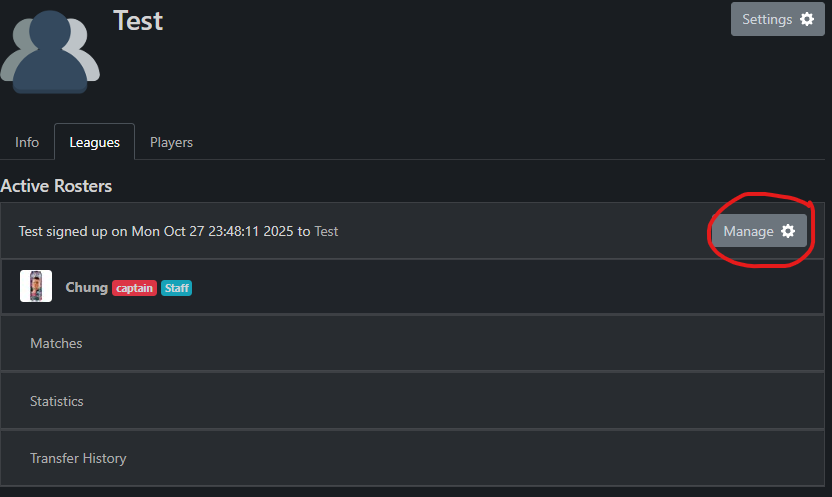
Afterwards, scroll down until you see you and your teammates.

Now you can request which player you want transferred, and an admin will either accept or deny the request.